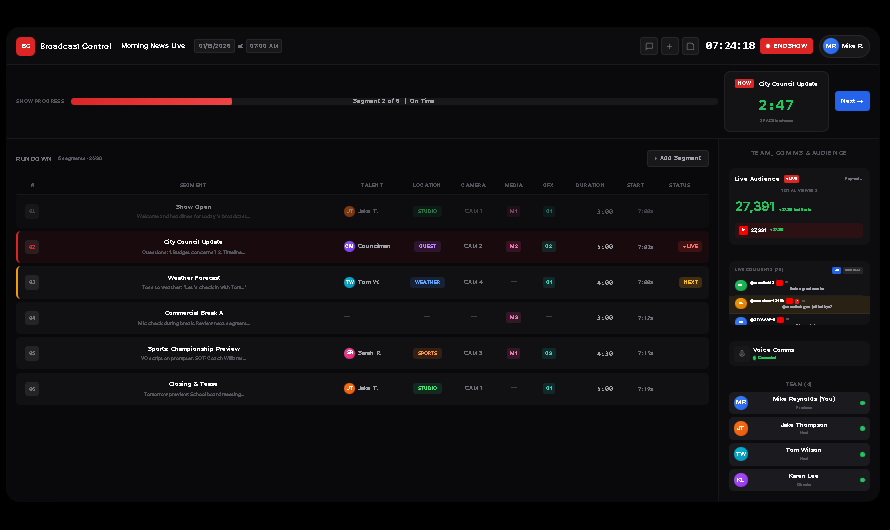
06Closing & TeaseTomorrow preview: School board meeting...JTJake T.STUDIOCAM 1—G15:007:19a
TEAM, COMMS & AUDIENCE
Live Audience● LIVE
Pop-out ↗
TOTAL VIEWERS
27,391+27,391 last 5 min
▶
27,391+27,391
LIVE COMMENTS (70)
AllQuestions
GM
@mendhak1211s
thats a great combo
NL
@nameless-1245k?11s
@mendhak gym jati hai kya?
GZ
@ZIYAAW-56s
@kanao bolre
Voice Comms
Connected
TEAM (4)
MR
Mike Reynolds (You)Producer
JT
Jake ThompsonHost
TW
Tom WilsonHost
KL
Karen LeeDirector
4–6
Separate tools replaced
Real-time
Sync across all devices
From $9
Per month. No per-seat fees
24/7
Automated monitoring
Features
Everything your production needs — without the complexity.
Six core systems in one connected platform — real-time, streamlined, and built to scale with your production.
Smart Rundowns
Build and edit rundowns in real-time. Drag-and-drop segments, set durations, and watch timing update automatically across all devices.
Live Timing
Real-time countdown timers, segment tracking, and automatic timing adjustments. Know exactly where you are and where you need to be.
Show Calendar
Plan your entire week at a glance. Visual calendar with color-coded shows, live status indicators, and one-click show access.
Crew Scheduling
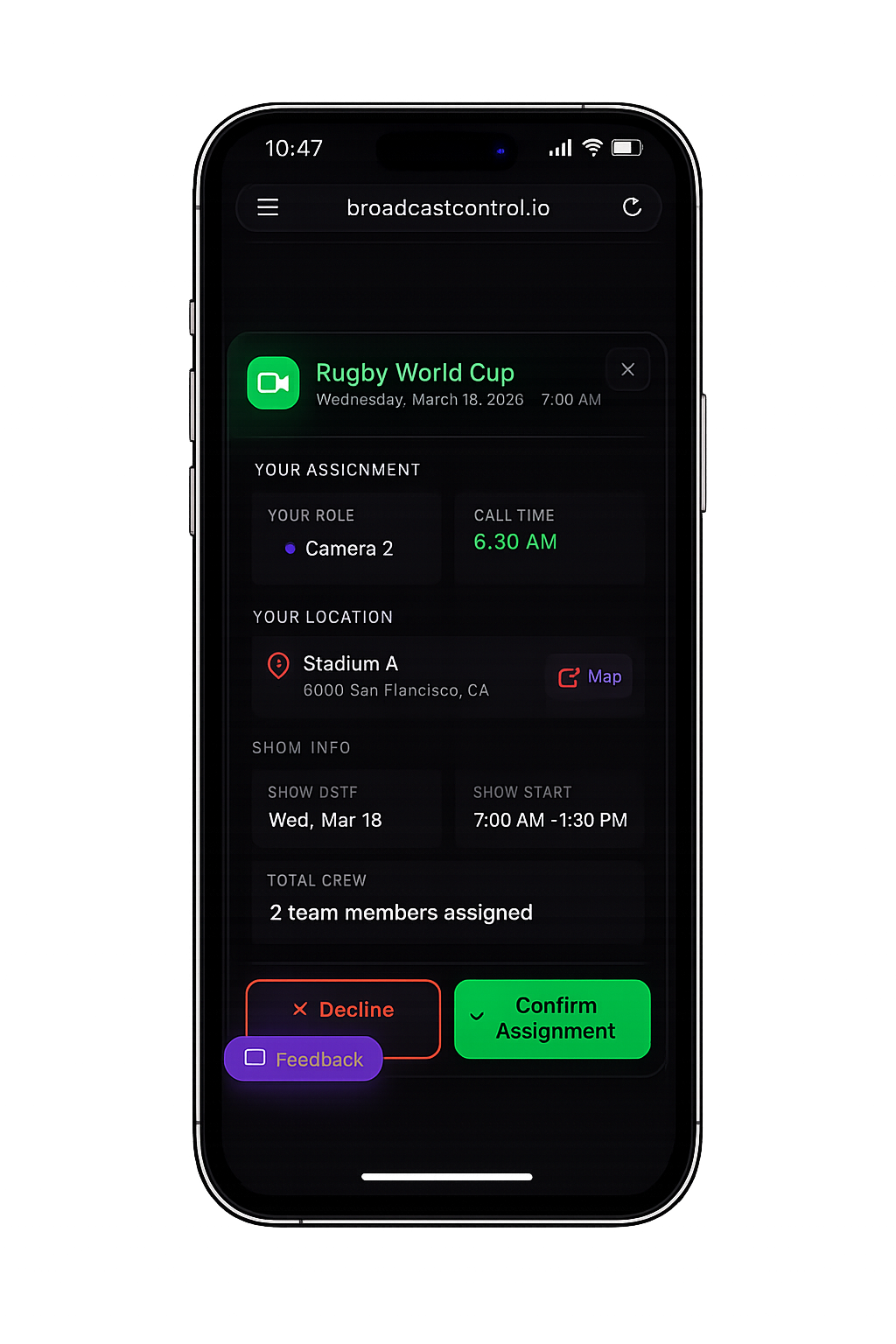
Uber-style job assignments. Crew receive notifications, accept or decline with one tap, and always know their call time and location.
Multi-Show Isolation
Run multiple shows simultaneously without interference. Each show has isolated voice comms, rundowns, and controls — perfect for busy production schedules.
Team Collaboration
Producers, directors, and hosts all see their role-specific views. Changes sync instantly across unlimited team members.
Built-in Teleprompter
Professional teleprompter that syncs with your rundown. Scripts update in real-time, display on any device.
AI Show Advisor
Smart recommendations when your show runs overtime. AI analyzes segment priority and suggests cuts to keep you on time.
Instant Messaging
Backup communication when voice isn't enough. Send quick messages to your team without disrupting the show flow.
Voice Communications
Enterprise-grade intercom built right in. Full-duplex partyline, crew private line, noise gate, adaptive bitrate, and end-to-end encryption — no hardware required.
Speech Recognition Prompter
Teleprompter that follows along as you speak. Auto-scrolls based on voice recognition so hosts never lose their place.
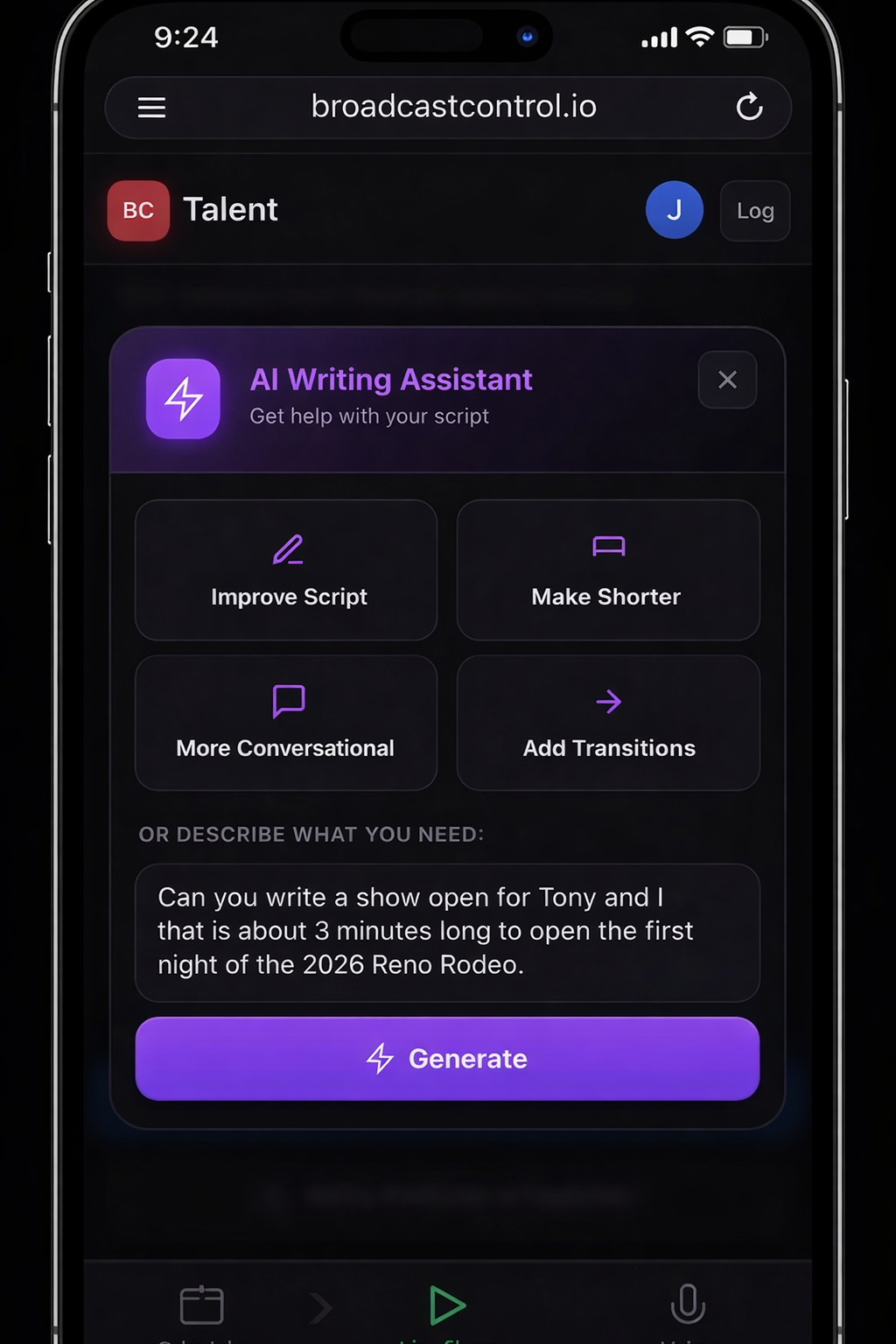
AI Writing Assistant
Need quick research or script help? AI assistant helps hosts with background info, talking points, and on-the-fly writing.
Post-Show AI Report
After every show, AI analyzes your rundown data — what ran long, what was cut, how timing tracked — and delivers a detailed performance breakdown to help every show run better than the last.
Print Your Show
Generate a complete printed show pack — full rundown with scripts, segment notes, timing, camera assignments, and talent cues — for anyone who needs a physical copy on the day.
Reliability
Built for real-world production.
When you're on air, "it usually works" isn't good enough. BC is built for the moment everything has to work.
Built for real productions where timing and communication matter.
Continuously tested. Always ready.
BC is tested around the clock. If anything breaks, our team is alerted immediately — often before it impacts your show.
Reliable comms — anywhere you are.
Works across WiFi, cellular, and mixed networks. Automatically reconnects if signal drops — so your team stays connected when it matters most.
Ready for any venue.
Move between locations without reconfiguring your setup. Screens, schedules, and playout recover automatically — even after a power loss.
Why Broadcast Control
Professional tools without the enterprise price tag.
Most producers are juggling separate bills for rundown software, intercom hardware, teleprompter apps, crew scheduling, and analytics dashboards. BC brings all of it together at a price that makes sense — whether you're a one-person show or a 30-person production team.
Basic
Solo & small teams
$9 / month
Live rundown — up to 2 team members
Built-in teleprompter
Live timing & segment tracking
Real-time team sync
Voice comms
Crew scheduling
AI show advisor
Most popular
Producer
Production teams
$39 / month
Everything in Basic — up to 5 members
Full duplex voice comms
Crew scheduling & assignments
AI show advisor & writing assistant
Director, Producer, Crew & Talent apps
Live audience analytics
Post-show AI report
Teams
Full broadcast operations
$79 / month
Everything in Producer — up to 30 members
Multiple simultaneous shows
Traffic & asset management suite
BC Bridge desktop playout app
Sponsor portal & fulfillment reports
Print show pack
Priority support
"As a freelance producer I was paying for tools I only used half the year. That's why I founded Broadcast Control — one subscription that covers everything, at a price that makes sense whether you're doing one show a month or twenty."
SC
Stewart Campbell
Founder & Producer, Broadcast Control
Show Planning
Plan your week, see your shows at a glance
The show calendar gives producers a bird's-eye view of everything happening. Color-coded shows, live status indicators, and instant access to any rundown. No more spreadsheets or calendar apps.
Week and month views with drag-and-drop scheduling
Blinking green when shows are ready, solid red when live
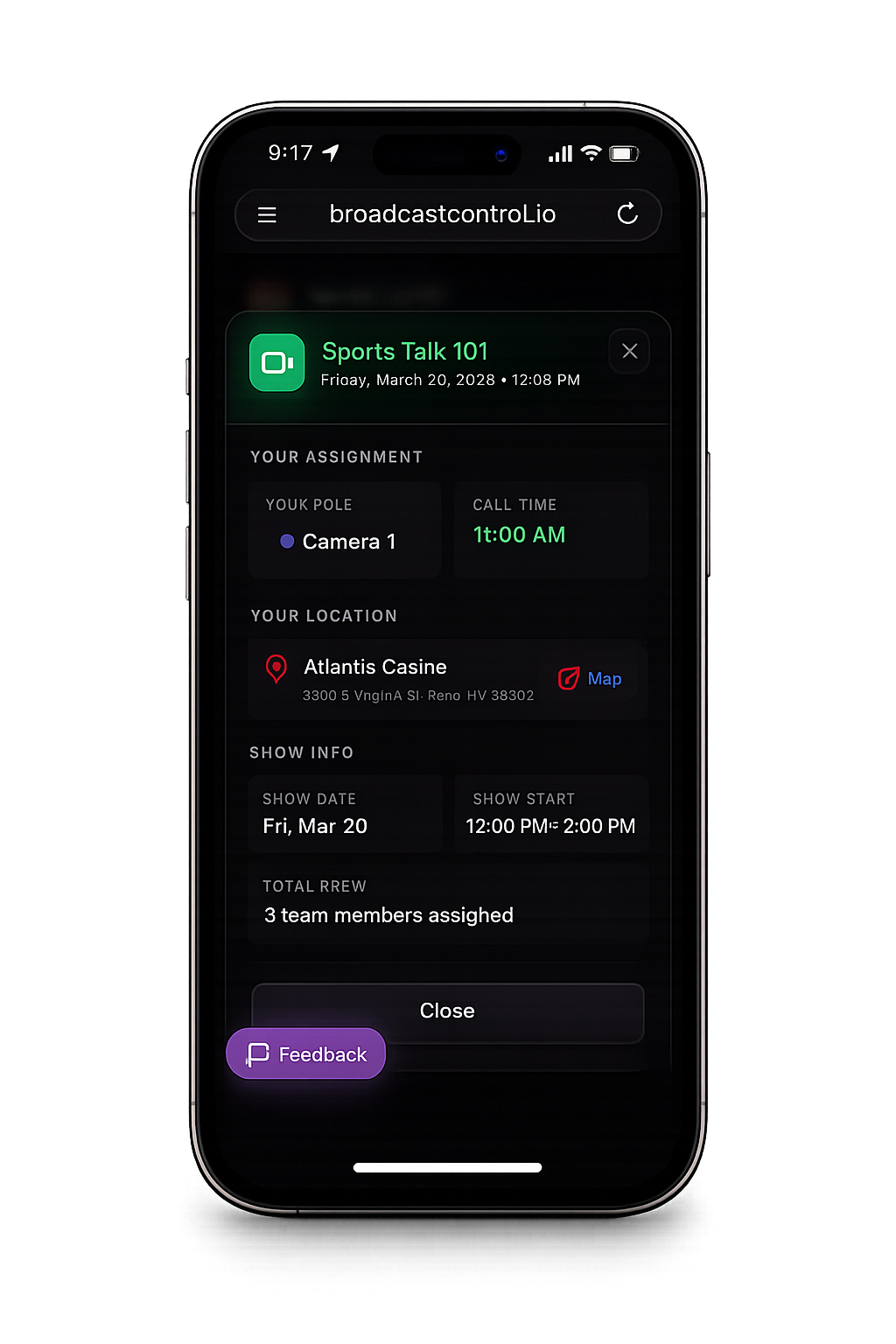
No more phone tag or group texts. Assign crew to shows and they get instant notifications. They can accept or decline with one tap, see their call time, location, and even get Google Maps directions.
One-tap Accept or Decline for crew members
Individual call times — not everyone arrives at once
Location with Google Maps link for directions
Email notifications for assignments, changes, and cancellations
Real-time Sync
Everyone sees the same thing, instantly
When a producer updates a segment, directors and hosts see the change in milliseconds. No refresh needed, no confusion, no missed cues.
Instant sync across all connected devices
Role-specific views for each team member
Works on any device with a browser
Producer
Interview
Weather
⟷
Director
Interview
Weather
⟷
Host
Interview
Weather
● Synced in real-time across all devices
AI-Powered
Smart suggestions when you need them most
Running overtime? The AI Show Advisor automatically analyzes your remaining segments and suggests the best cuts to get back on schedule.
Prioritizes segments by content importance
One-click approval or dismissal
Never cuts breaking news or live guests
AI Show Advisor
+2:30 Over
Show running overtime. 2 segments recommended for cut:
Weather Preview-2:00
Pre-recorded, can be rescheduled
Sports Teaser-1:30
Low priority, no live guest
The Complete Production Platform
Why pay for six tools when one platform does it all?
Rundown software, teleprompter apps, intercom hardware, crew scheduling, audience analytics, sponsor tracking — most teams pay for each one separately. BC replaces all of them.
vs. Rundown Studio
Rundown + teleprompter only. No voice comms, no crew scheduling, no sponsor management, no live analytics.
vs. Dramatify
Production management for scripted TV. No built-in intercom, no live audience analytics, no sponsor portal.
vs. RTS / Clear-Com
Professional wireless intercom systems can cost $5,000–$8,000 for a complete setup — before headsets, beltpacks, or installation. No rundown, no teleprompter, no production software.
Broadcast Control
Everything. Rundown, teleprompter, AI advisor, crew scheduling, voice comms, live analytics, sponsor portal — from $39/month.
Every member of your team already carries a device with a microphone, a screen, and an internet connection. Whether they are on venue WiFi, a 5G connection, a mobile hotspot, or hardwired ethernet — Broadcast Control turns that device into a professional production terminal. No belt packs to charge, no frequencies to coordinate, no range limits, no additional hardware budget.
Works on Every Device
Enterprise-grade intercom. Built right in.
The same cloud-based intercom architecture used by major broadcast networks — fully integrated into your production platform. No hardware. No frequency coordination. No separate subscription.
Full-duplex partyline with intelligent noise gate
Opus codec with Forward Error Correction, adaptive bitrate, and an automatic noise gate that keeps crowd noise and background sounds off the intercom between words — clean comms even in loud venues.
Dedicated crew private line
A separate encrypted channel for producers, directors, and technical crew — activated show-wide with one button. Talent hears nothing. The equivalent of a professional IFB interrupt system, built in.
Full producer control
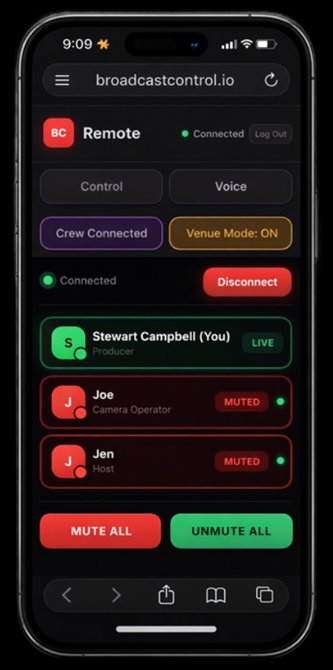
Mute individuals remotely, silence talent channel for crew-only communication, monitor network quality per person in real time, and see who's speaking at a glance — from the main app or the remote producer interface.
Venue mode for live events
One-tap venue mode optimises the entire team's audio for loud arena environments — applies a dynamics compressor to balance everyone's voice, keeps noise suppression active to reduce crowd hum, and disables echo cancellation that gets confused by PA systems. Activated show-wide instantly so every connected crew member switches simultaneously.
Encrypted end-to-end with auto recovery
DTLS-SRTP encrypted WebRTC audio — the same security standard used by enterprise video conferencing. Automatic ICE restart and socket reconnection means a dropped WiFi signal recovers in seconds without anyone touching anything.
Works everywhere your team is
Control room, studio floor, arena pit, remote location — anyone with a phone and a headset is on comms. AirPods, IFB earpieces, USB headsets, Bluetooth earbuds — if it connects to a device, it works. No belt packs to charge, no frequencies to coordinate, no extra subscriptions.
Voice Comms
5 connected
Live
MR
Mike Reynolds
Producer
AirPods Pro
JT
Jake Thompson
Host — Studio
IFB Earpiece
KL
Karen Lee
Director — Control Room
USB Headset
TW
Tom Wilson
Weather — Remote
Galaxy Buds
RTS / Clear-Com Hardware
$5,000–$8,000+
Matrix + belt packs + setup
Broadcast Control
Included
With Producer & Teams plans
DTLS-SRTP encrypted · Same standard as enterprise video conferencing
Teams Exclusive Feature
Live Audience Integration
See your entire audience in real-time. Track viewer counts across YouTube, Facebook, Twitch, and TikTok — all in one unified dashboard while you produce your show.
Real-Time Viewer Counts
Watch your audience grow live. See total viewers across all platforms with per-platform breakdowns updated every few seconds.
Live Comment Feed
See all comments from all platforms in one unified feed. Filter by questions to find audience Q&A opportunities instantly.
Send to Teleprompter
One click sends viewer questions directly to your host's teleprompter. Perfect for live Q&A segments and audience interaction.
Session Analytics
After your show, review detailed analytics including peak viewers, engagement patterns, and AI-generated insights about your audience.
Supported Platforms
▶
YouTube
f
Facebook
Twitch
♪
TikTok
Live Audience● LIVE
Pop-out ↗
Total Viewers
27,391
↑ +2,847 in last 5 min
▶
YouTube
18,234
+1,523
f
Facebook
6,891
+892
Twitch
2,266
+432
Live Comments
AllQuestions
JD
@johndoe_tv2s
Great show today! 🔥
SM
@sarah_m?5s
What time is the interview segment?
Pro & Teams Feature
Every role. Every device. Every location.
Dedicated interfaces for every member of your team — built around how they actually work, on the device already in their hands.
Director & Producer
Remote Production Control
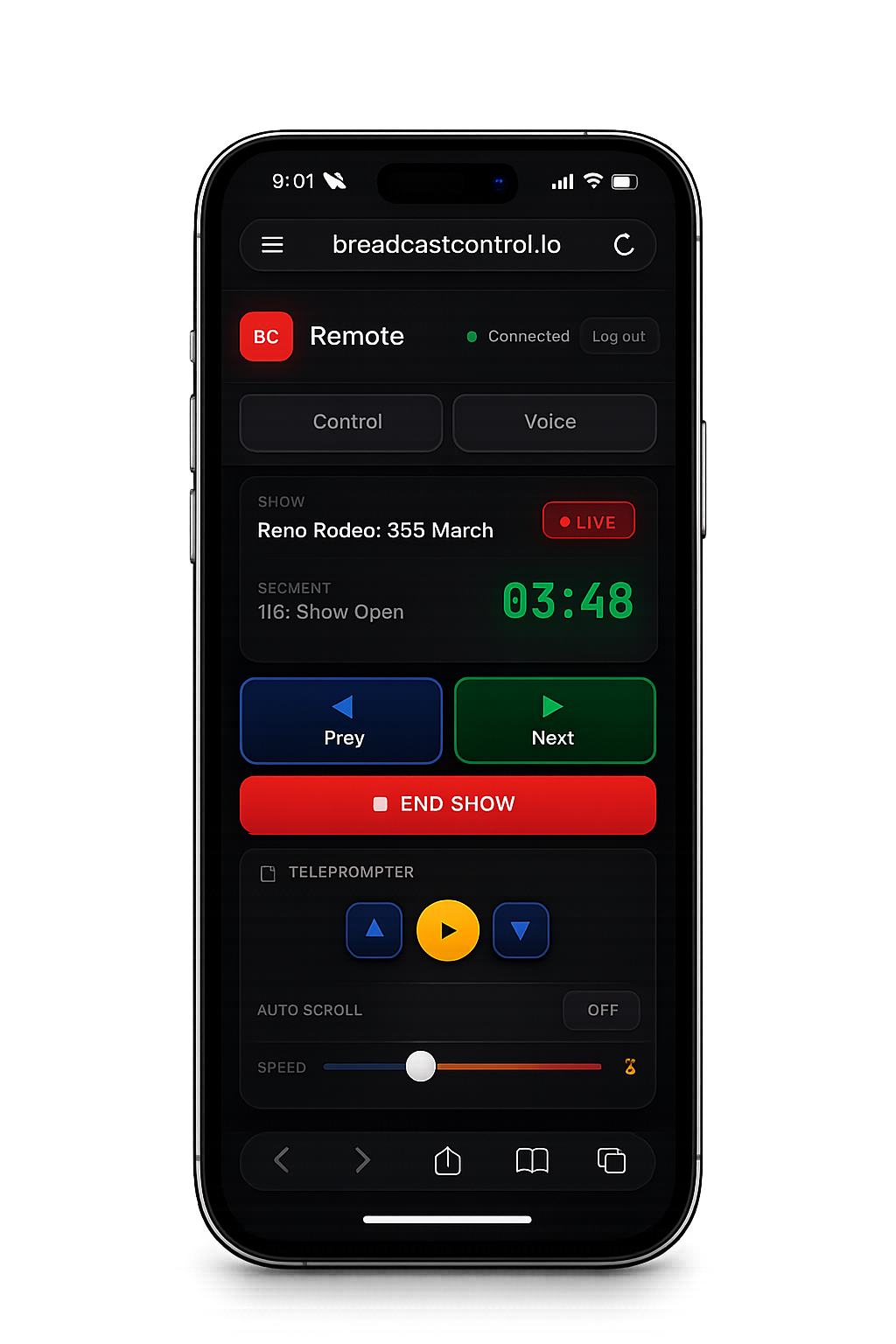
Run the entire show from your phone — from anywhere on Earth. Full segment control, teleprompter, voice comms, and real-time sync with the studio.
Control segments — go live, skip, advance, mark complete
Control talent teleprompter speed and scrolling remotely
Full voice comms — always-on mic, mute individuals, mute all
Crew private line — talk to crew without talent hearing
Venue mode — one tap to optimise audio for arena environments
Real-time show sync — same view as the studio, always
Whether you're in the control room, on the venue floor, or producing from a different city — you have full production control from your phone.
Hosts & Anchors
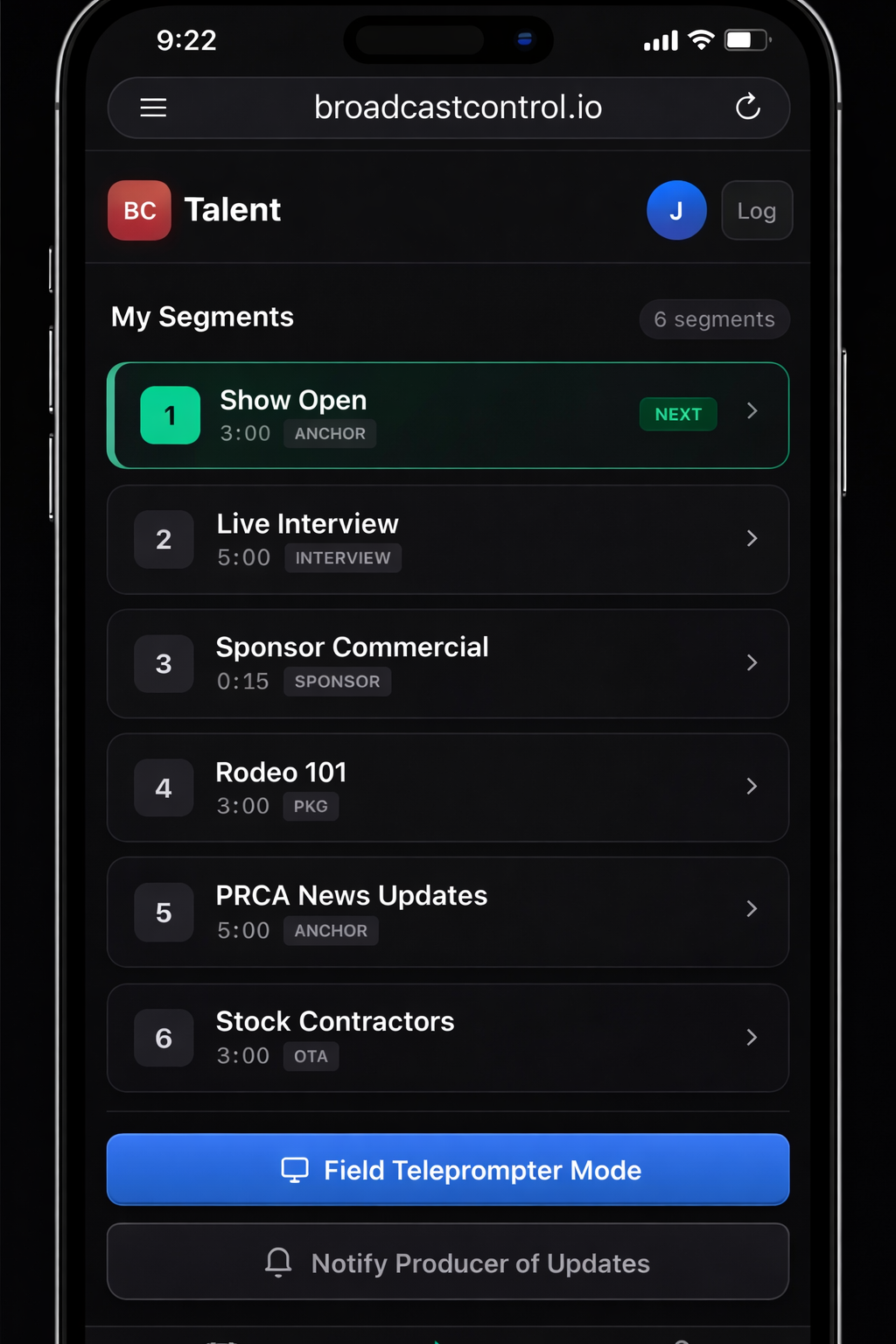
Talent App
A full professional studio in their pocket. Field teleprompter, AI writing assistant, voice comms, and show management — all synced live with the control room.
Field teleprompter — full-screen, synced live with the studio
Producer controls teleprompter speed and scrolling remotely
Voice-activated auto-scroll — follows their speech automatically
AI writing assistant — research, talking points, and script help on demand
Voice comms — hear producer and director directly in their earpiece
Show schedule — upcoming appearances, call times, and details
Accept or decline show bookings with one tap
Talent in the field, on location, or on set gets a professional prompter and a direct line to the producer — no separate hardware required.
Camera Ops, TDs, Engineers
Crew App
Everything crew needs to stay on top of the show — current segment, countdown, voice comms, and their schedule — without ever being able to accidentally edit the rundown.
Current segment and what's coming next — visible at a glance
Large countdown timer — readable from across the room
Push-to-talk voice comms — noise-gated for clean transmissions
Show schedule — call times, location, and assignment details
Accept or decline show assignments with one tap
View-only — no accidental rundown edits
Every crew member's phone becomes a professional intercom station. WiFi, 5G, or hardwired — no belt packs, no frequencies, no range limits.
Remote and Talent apps available with Producer and Teams subscriptions
BC App Store
Download purpose-built tools for live production.
Browse and buy operator apps that plug into the Broadcast Control workflow, from local PTZ joystick control to remote camera-operation sessions.
Desktop app
Maverick Control
Local USB joystick control for VISCA/IP PTZ cameras at the venue.
$9.99
one-time
Camera scan, manual IP add, labels, and joystick slots.
Built for venue operators watching physical program monitors.
A professional traffic and asset management suite — built into your production platform
Most productions still run sponsor reads off paper, load commercials manually, and track fulfillment on spreadsheets. Broadcast Control replaces all of that with a fully integrated traffic system — from asset upload to proof of performance — connected directly to your live rundown.
Upload once, use everywhere— Add sponsor videos, paid advertising clips, graphics, host reads, slides, or any media asset to your library. BC Bridge auto-normalizes every format. When an asset is added to a rundown, the host's script read appears automatically in their segment — no paper, no running files to people.
Traffic scheduling and playout— Build content playlists and schedule paid assets across every screen at your venue — concerts, sports arenas, festivals, churches, auctions, conference halls. BC Bridge outputs via NDI or HDMI to any physical screen, and can drive a 24/7 live stream or broadcast channel — fully automated, no babysitting required.
Director gets the exact file — direct from the rundown— When building a show, the director sees exactly which paid assets need to run and can download the actual video file straight from BC into their broadcast software or hardware for ingest. The rundown tells you how many sponsor spots are required, and tracks which have been placed.
Real-time fulfillment tracking— The moment a director advances through a sponsor segment in a live show, the portal logs it instantly. If an asset is contracted to run 7 times across 7 shows, it tracks every airing. Once the contract is fulfilled, the asset stops appearing in the rundown builder automatically — no manual checks, no missed obligations.
Proof of performance reports— Export a detailed report per sponsor or advertiser showing every show the asset aired on, the exact date and time, and — when paired with Live Audience integration — precisely how many people were watching at that moment. The kind of reporting that turns a one-time sponsor into a long-term partner.
Whether you're running a morning news broadcast or a Sunday service, Broadcast Control adapts to your workflow.
Television & Broadcasting
Professional broadcast control for news, talk shows, and live productions.
Churches & Worship
Keep services running smoothly with sermon timing and worship flow management.
Schools & Education
Perfect for school broadcasts, assemblies, and student-run productions.
Live Events & Streaming
Conferences, concerts, esports, and live streams of all sizes.
Banquets & Galas
Coordinate speakers, presentations, and entertainment with precise timing for elegant events.
Conferences
Manage multi-track sessions, keynotes, and breakouts across multiple stages and rooms.
Live Auctions
Keep bidding moving with lot timing, auctioneer cues, and real-time coordination.
Podcasts & Video Shows
Structure episodes with segments, guest slots, ad reads, and teleprompter — live or pre-recorded.
Pricing
Pricing that makes sense
No hidden fees. No per-seat surprises. Three straightforward plans that grow with your team — and an Enterprise option for organisations that need custom scale.
Basic
Perfect for solo creators and small teams just getting started
For large organisations, broadcast networks, and multi-venue operations that need custom scale — including bespoke software tools and apps built specifically for your organisation